Before I start: the title is obviously clickbait. It was inspired by ClickUp and their “Jira killer” ads that showed up before every single YouTube video during Covid times.
In a previous post, I talked about my terminal-based note-taking tool/framework (if you haven’t read it, read it first 😁). The system is more than 1.5 years old now, and by this point it holds thousands of lines of notes and hundreds of to-dos.
Which brings a new problem: how do I see all the to-dos I wrote to myself? How do I search them? And most importantly, how do I organize them using whatever system I feel like using this month (GTD, Kanban, Eisenhower quadrants …)?
My requirements were the same as always: simplicity, minimal dependencies, low resource consumption, and everything in the CLI if possible. And if the solution could stay generic enough to cover other use cases, even better.
The solution was a small system with the notes themselves as the backend, and a new terminal application as the frontend.
The notes are the database
The system is very simple: the state of a to-do lives in the note itself. Each checkbox - [ ] carries its own state through #tags at the end of the line.
Tags come in two flavours:
- Real tags: context for the to-do, e.g. project, domain …
- Status tags: for now I only have 3
#qN: position on the quadrant board#kN: position on the Kanban board#hl: highlighted
We’ll talk about the boards in a bit.
Nothing else is stored anywhere. No database, no sync, no lock file. If I delete the TUI tomorrow, my to-dos are still plain Markdown lines I can grep.
The board configuration
Every directory managed by board-tui has a .board.json file that holds the board configuration for the notes it contains:
- name and description: general information about the board
- recursive: whether board-tui should walk the subdirectories or not
- exclude: Markdown files to skip
- showDone: whether done to-dos show up in the TUI or not
- mode: the type of board to display the to-dos in. For now I only support
quadrantandkanban - bins: the bins to include in the board
Here is an example of a board configuration:
{
  "name": "Demo Gear",
  "description": "placeholder kanban board for demos",
  "mode": "kanban",
  "bins": ["Backlog", "Evaluating", "Keeping", "Dropped"]
}
The boards
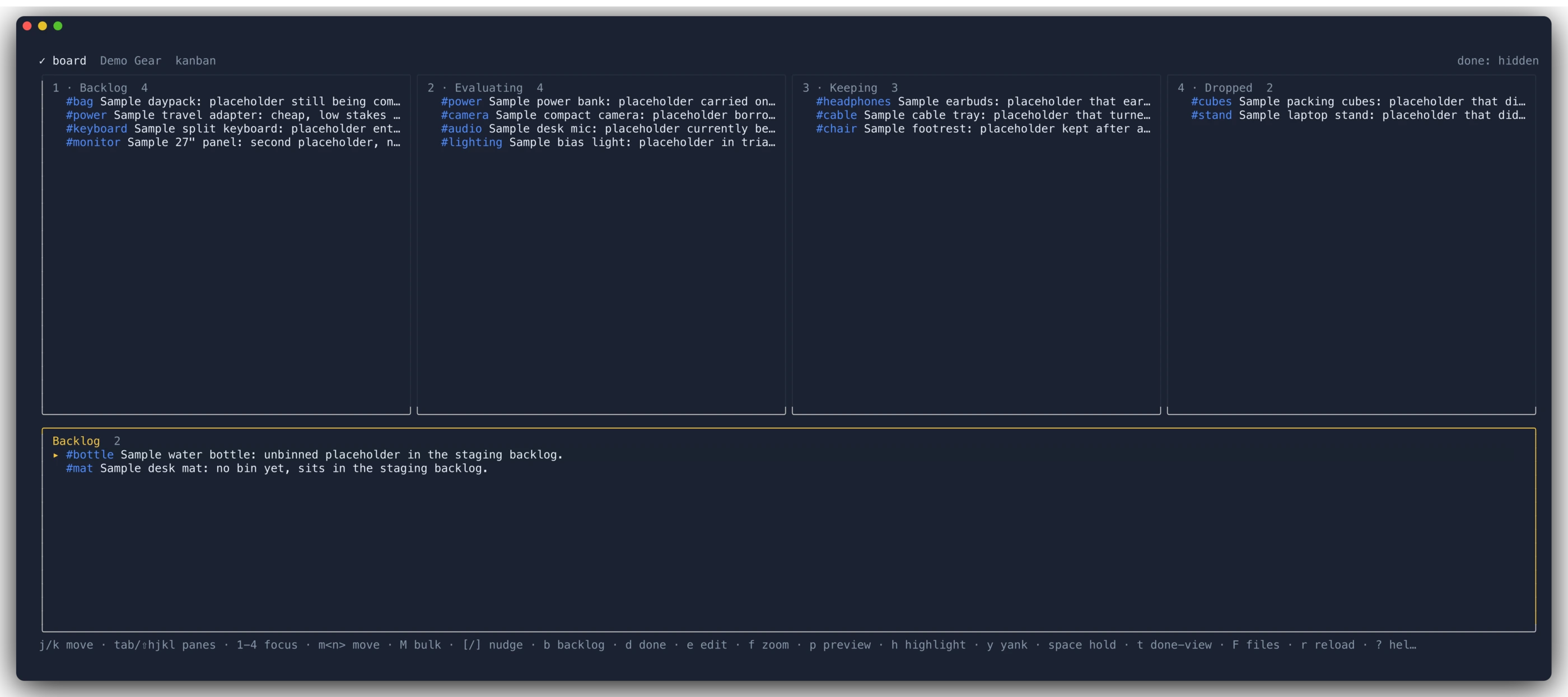
And here is what it actually looks like. A Kanban board, one pane per bin, each card being a single checkbox line from some Markdown file:
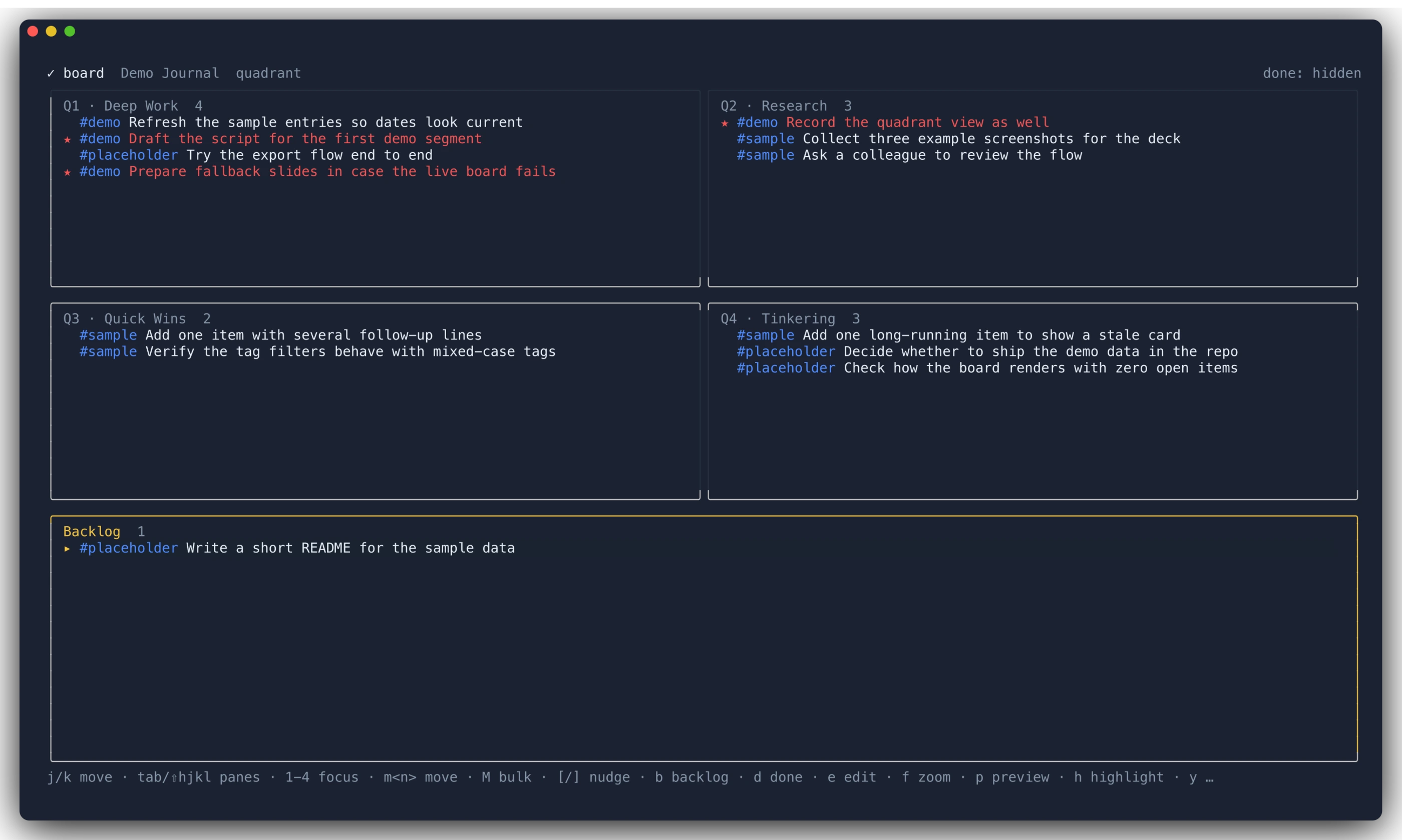
The same notes can be looked at as an Eisenhower quadrant instead, just by changing mode in .board.json:
A few things are visible in both screenshots:
- Anything not tagged yet lands in the Backlog pane at the bottom. That’s my inbox: I write to-dos while taking notes without thinking about where they belong, and I bin them later.
- Highlighted items (
#hl) are the ones in red with a*, so the two or three things that actually matter today stand out. done: hiddenin the corner is theshowDoneflag, one keystroke away from showing everything again.
Navigation is what you’d expect from a terminal app: j/k to move, tab and hjkl between panes, 1-4 to focus a bin, m<n> to move an item to bin n, d to mark it done, e to open the note in my editor at the right line, p to preview, r to reload. Every one of these edits the Markdown file in place, which means the note and the board can never drift apart.
Was it worth it?
For me, yes. I didn’t replace Jira, and I don’t want to. What I got is a view over notes I was already writing anyway, with no new place to maintain, no app to open, and no to-do that exists only inside a tool.