One of the many things I’d been procrastinating on was running a Large Language Model (LLM) locally.
One weekend, I finally decided to do it. It was supposed to be simple, but my curiosity wouldn’t let me just follow a guide and move on. I wanted to actually understand the ecosystem and how everything works, without diving too deep into the math or internals.
Here’s what I learned, from a complete beginner’s point of view:
If you want to go through the entire learning process, check my learning notes in the wiki
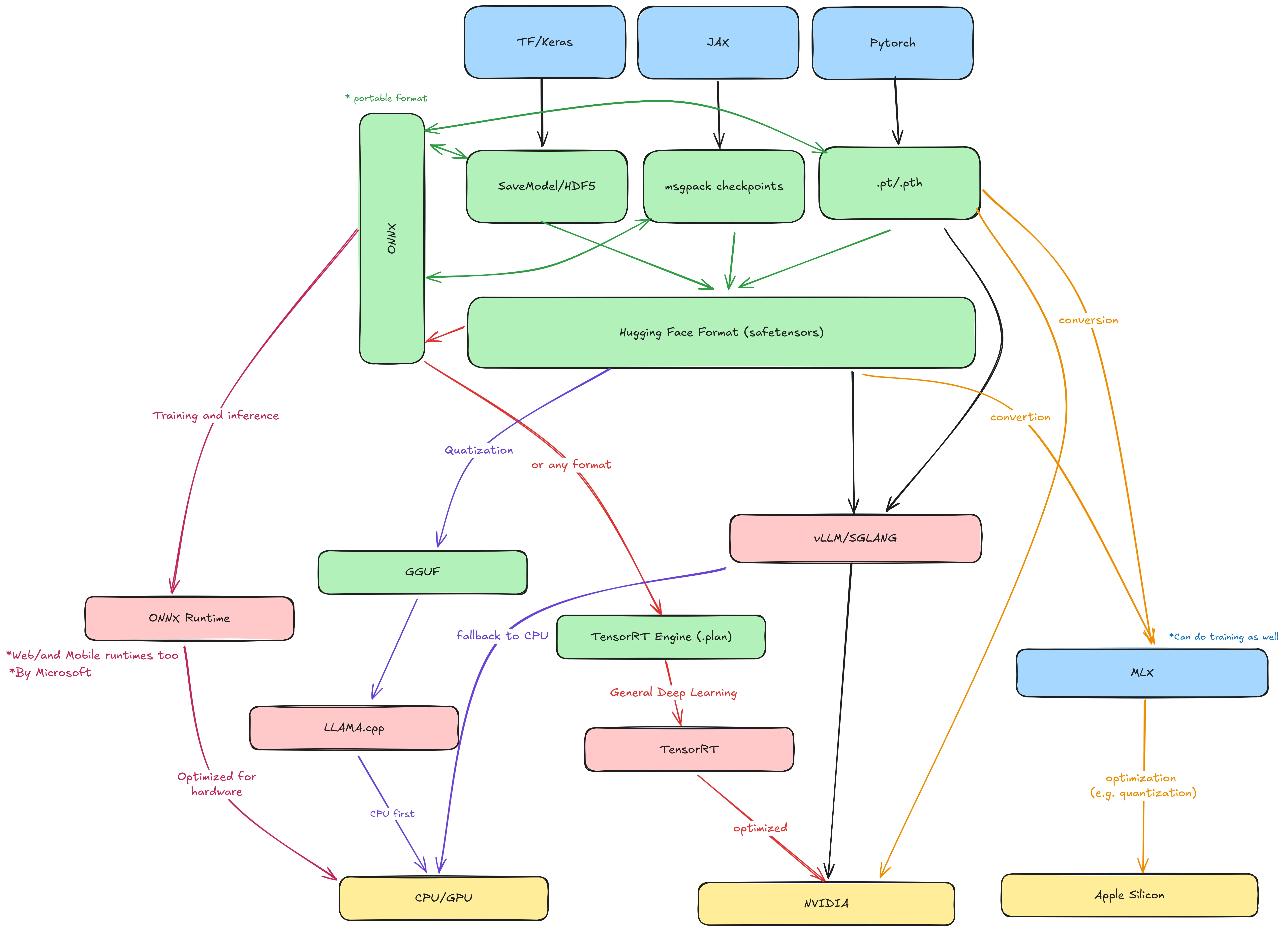
If you’re a data scientist, you might find this oversimplified. Please don’t judge, and share your feedback instead 😂. But if you’re new to this like me, here’s my simple breakdown of how I understood things.
How LLMs Are Built
- LLM stands for Large Language Model, and it’s a type of machine learning model.
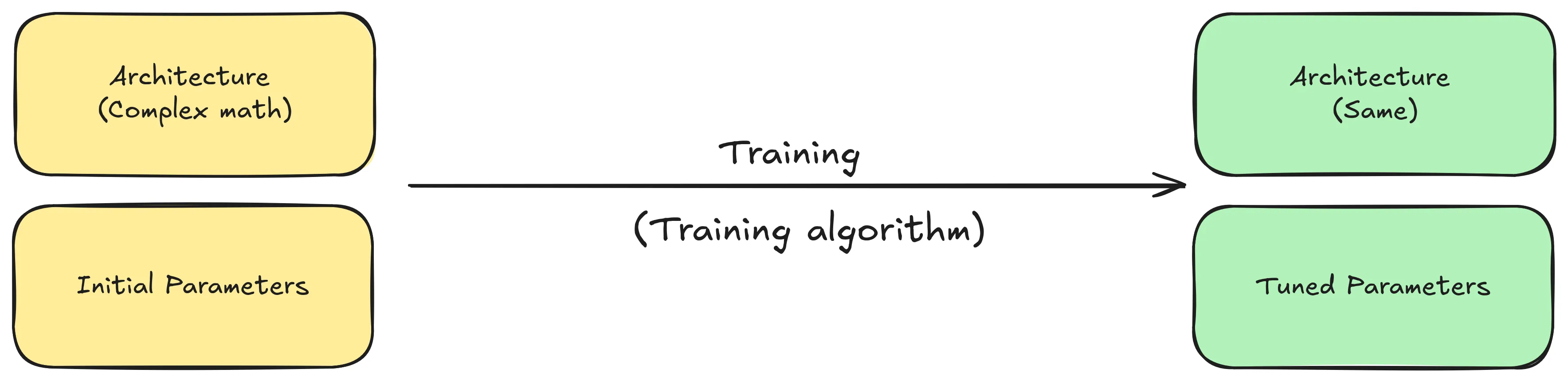
- A machine learning model is essentially made up of two main things (or more, who knows 😝):
- Architecture: The mathematical structure defining how data flows through the model.
- Parameters (Weights): A huge set of numbers (matrices) that determine how the model behaves.
- Training a model means repeatedly running data through its architecture while adjusting its parameters to improve the model performance/accuracy. Until you end up with a trained model.
- Because LLMs deal with language, they also include components like tokenizers, embeddings, and maybe other linguistic tools that I know nothing about.
- To train a model, you typically use a machine learning framework, which provides the tools to simplify the process.
- The resulting trained models are saved as a combination of text and binary files (for example, in Pickle or other formats).
- Hugging Face introduced the
safetensorsformat: a safer and faster alternative to Pickle that can be converted from other formats such as PyTorch. - ONNX (Open Neural Network Exchange) is an open standard that allows models trained in one framework to be used in another.
| Framework | Output format | File extension |
|---|---|---|
| TensorFlow / Keras | SavedModel | .pb |
| JAX | msgpack/pytree | .msgpack / .pkl |
| PyTorch | PyTorch | .pt / .pth |
| Scikit-learn | joblib | .joblib |
| Any | safetensors | .safetensors |
| Any | onnx | .onnx |
Running the LLM (Inference)
Once you’ve built and trained your model, and have your .safetensors or .pt/.pth file, it’s time to run it. This process is called inference.
- If your model is in ONNX format, you can use ONNX Runtime for inference.
- Otherwise, you need to define the target hardware where the model will run.
Inference on Apple Silicon
- Apple provides a framework called MLX for running models on Apple Silicon chips.
- MLX can handle both training and inference, supports models built in other frameworks, and automatically optimizes them for Apple GPUs and CPUs.
Inference on NVIDIA GPUs
NVIDIA TensorRT is a framework that optimizes deep learning models for NVIDIA GPUs. It takes models built with other frameworks and converts them into a highly efficient GPU runtime.
There are also specialized inference runtimes like vLLM and SGLang, which efficiently serve LLMs on GPUs. They’re ideal for people deploying large models in production or business contexts.
When to Choose SGLang Over vLLM: Multi-Turn Conversations and KV Cache Reuse | Runpod Blog
Inference on CPUs
Before running models on CPUs, it’s useful to understand quantization.
- Quantization is a technique that reduces model precision, converting weights and activations from high-precision (e.g., 32-bit floats) to lower-precision (e.g., 8-bit integers).
- Think of it like reducing a video from 1080p to 360p: you lose some detail, but it still works fine.
- The most popular tool for this is
llama.cpp, which converts.safetensorsmodels into a quantized GGUF format (previously GGML). GGUF models are optimized for CPU inference using thellama.cppruntime.
So How Do You Actually Run an LLM?
llama.cppmade it possible (and surprisingly easy) to run LLMs on personal computers. You just need a.ggufmodel file and thellama.cppbinary.- Several tools now simplify this even further for personal use, including LM Studio, GPT4All, and the most popular one: Ollama.
- Ollama uses a container-like system to manage, distribute, and run models in an OCI-compatible format.
- As a result, container tools like Docker and Podman have started integrating support for running Ollama-compatible models directly in containers.
My Favorite Way to Run LLMs Locally
I love containers, but I don’t want to install Docker or Podman Desktop just to run models. Fortunately, the same team behind Podman recently introduced a cool project called Ramalama.
Ramalama automatically detects your hardware, pulls everything needed to run a model, and chooses the appropriate runtime. Using vLLM for GPU acceleration or llama.cpp for CPU inference.
It supports multiple model sources, including:
- Ollama (
ollama://) - OCI registries (
oci://) - Hugging Face (
hf://) - and others.
- Ollama (
You can even build your own model container with Podman, push it to an OCI registry, and run it anywhere using Ramalama.
When you run a model, Ramalama automatically detects your hardware and picks the best image and runtime based on available accelerators.
Here’s an example:
# Pull a model from Hugging Face
ramalama pull huggingface://afrideva/Tiny-Vicuna-1B-GGUF/tiny-vicuna-1b.q2_k.gguf

# Pull a model from Ollama's library (default)
ramalama pull ollama://library/qwen3:0.6b

# Equivalent to the previous command
ramalama --runtime=llamacpp run --image quay.io/ramalama/ramalama ollama://library/qwen3:0.6b

# Run qwen3 using vLLM runtime with CUDA acceleration
ramalama --runtime=vllm run --image quay.io/ramalama/cuda ollama://library/qwen3:0.6b

# Serve a model on a port (with or without a web UI)
ramalama serve huggingface://afrideva/Tiny-Vicuna-1B-GGUF/tiny-vicuna-1b.q2_k.gguf
That’s it
Running LLMs on your machine is way easier than you may think, especially with what Docker and Podman were working on lately. Also since the models are packages in OCI compatible/friendly formats you can easily take a look on how things look and what goes where.
Finally, I just started and I am still learning about all of this. You can follow my learning journey in my Wiki